Next-Gen Logistics PlatformPower Every Shipment with Our
Intelligent Operations Portal
Our Operations Portal is designed to manage the complete shipment lifecycle. From creating orders and scheduling pickups to warehouse operations, route planning, delivery execution, and returns, every logistics process is managed from one centralized platform.
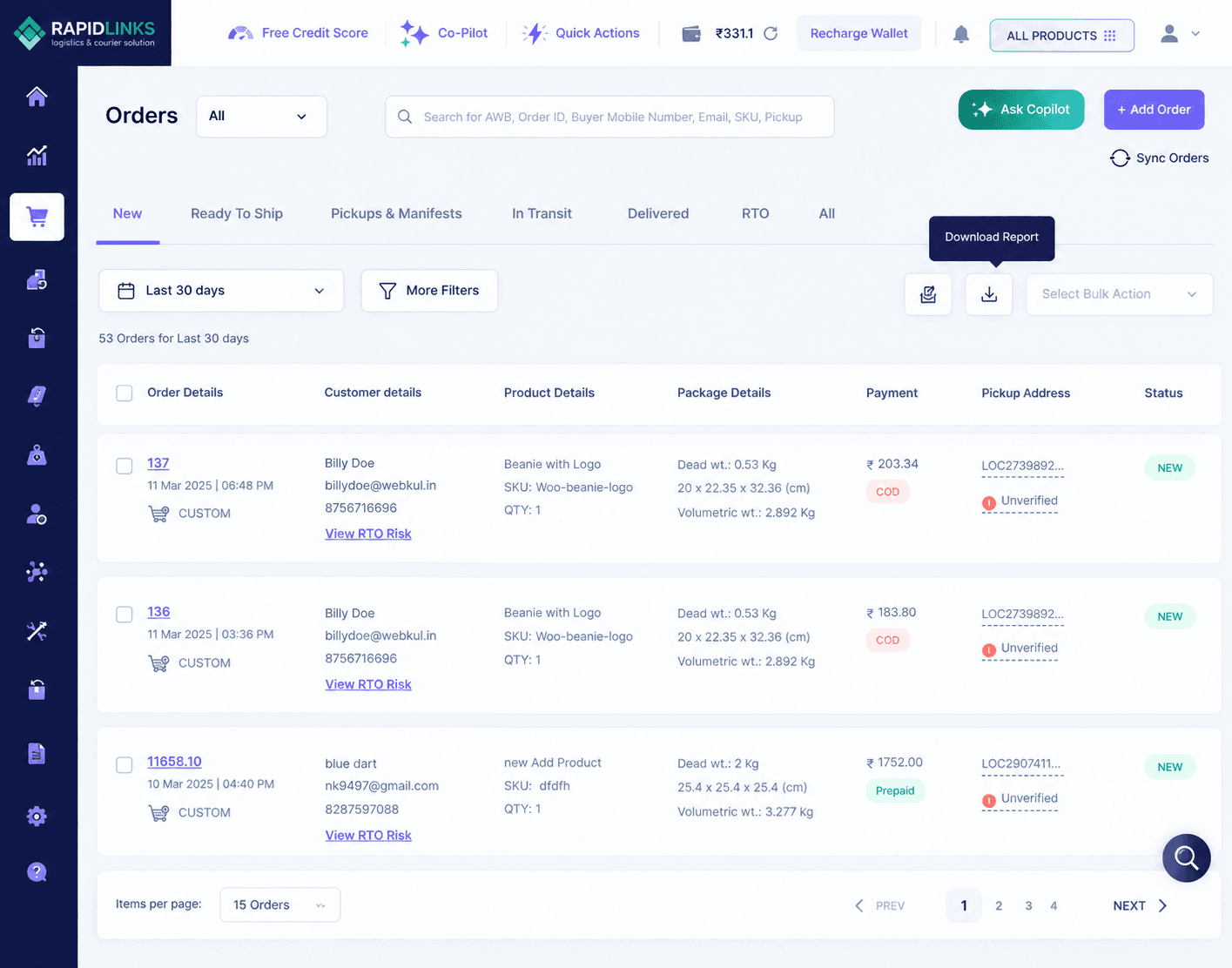
Order Management
Order Management is the starting point of every shipment. It allows operations teams to create, organize, assign, monitor, and update shipment orders throughout their entire journey until delivery. Every shipment begins with an order. A centralized order management system reduces manual work, minimizes errors, and provides complete visibility into shipment progress.
Key Features
- Create Domestic & International Orders
- Generate AWB Numbers
- Edit Order Details
- Assign Pickup Requests
- Manage Shipment Status
- Search Orders by AWB or Order ID
- Print Shipping Labels
- Cancel or Hold Orders
- Duplicate Existing Orders
Workflow Process
Pickup Management
Pickup Management helps schedule and coordinate the collection of shipments directly from customers or warehouses. A well-managed pickup process ensures shipments enter the logistics network quickly and without delays.
Key Features
- Schedule Customer Pickups
- Assign Pickup Executives
- Manage Pickup Requests
- Reschedule Pickups
- Confirm Pickup Completion
- Track Pickup Status
- Notify Customers Automatically
Workflow Process
Hub Operations
Hub Operations manage everything that happens inside warehouses and sorting centers after shipments are collected. Efficient hub operations reduce delays, improve shipment accuracy, and speed up transportation.
Key Features
- Shipment Receiving
- Barcode Scanning
- Shipment Sorting
- Load & Unload Vehicles
- Transfer Between Hubs
- Warehouse Inventory Tracking
- Scan Verification
Workflow Process
Manifest Management
Manifest Management helps operations teams organize multiple shipment orders into a single transport document for warehouse-to-warehouse movement. It provides complete visibility of package movement, scan progress, transit status, and receiving operations while ensuring every shipment is tracked accurately from dispatch to destination.
Key Features
- Create Temporary & Confirmed Manifests
- Auto Generate Unique Manifest ID
- Assign Multiple Orders & Packages
- Transfer Shipments Between Warehouses
- Track Manifest Status in Real Time
- Monitor Package Scan Progress
- Handle Partial Receipts at Destination
- Complete, Stop or Cancel Manifest
- View Complete Manifest Timeline
- Print & Share Manifest Documents
Workflow Process
Route Planning
Route Planning automatically determines the most efficient delivery route for drivers. Optimized routes reduce delivery time, fuel costs, and operational expenses.
Key Features
- Optimize Delivery Routes
- Allocate Drivers
- Zone-wise Planning
- Delivery Scheduling
- Route Monitoring
- Traffic-aware Routing
- ETA Calculation
Workflow Process
Pickup & Delivery
This module manages the complete last-mile delivery process after shipments leave the warehouse. Efficient last-mile delivery directly impacts customer satisfaction and delivery success rates.
Key Features
- Assign Delivery Executives
- Track Delivery Progress
- Update Delivery Status
- Capture Proof of Delivery (POD)
- OTP Verification
- Customer Notifications
- Failed Delivery Handling
Workflow Process
Discrepancy Tracking
This module records and resolves operational issues during shipment processing. It helps identify damaged shipments, missing packages, incorrect scans, and operational exceptions before they affect customers.
Key Features
- Report Damaged Shipments
- Missing Package Tracking
- Wrong Scan Detection
- Exception Reporting
- Investigation Workflow
- Resolution Tracking
- Audit Logs
Workflow Process
Returns (RTO)
Return Management handles shipments that cannot be delivered and need to be returned to the sender. A structured return process reduces losses, improves customer communication, and speeds up reverse logistics.
Key Features
- Track Failed Deliveries
- Initiate RTO
- Reverse Pickup
- Warehouse Processing
- Customer Notifications
- Return Status Updates
- RTO Analytics
Workflow Process
Operational PortalQuestions Answered
Everything you need to know about our platform